IDE Integration
You do not need a special editor to develop Titanium apps. A project is JavaScript, XML and TSS, and the Titanium CLI does the building, so any editor will do.
For an integrated experience, three editors have a Titanium package: it builds and runs your app on a simulator or device without leaving the window, generates Alloy files, and streams the build log. Visual Studio Code and the JetBrains plugin debug as well.

TiDev maintains the first two. The JetBrains plugin is a community project.
All three drive the Titanium CLI you installed on the setup page for your machine, and inherit its requirements, including Node.js 22.19.0 or 24.x.
Visual Studio Code
The extension is Titanium, published by TiDev on the Visual Studio Marketplace.
Install it from a terminal:
code --install-extension tidev.titanium-sdkOr open the Extensions view, search for Titanium, and pick the one published
by TiDev.
It needs Visual Studio Code 1.100.0 or newer.
The extension loads when the folder you open contains a tiapp.xml. Open a
project directory rather than a parent folder holding several, or its commands
will not appear in the Command Palette.
What it adds
A Titanium view in the Activity Bar lists the platforms you can build for and the targets under each: simulators, emulators, and connected devices. Build commands are available inline on a target and on its right-click menu.
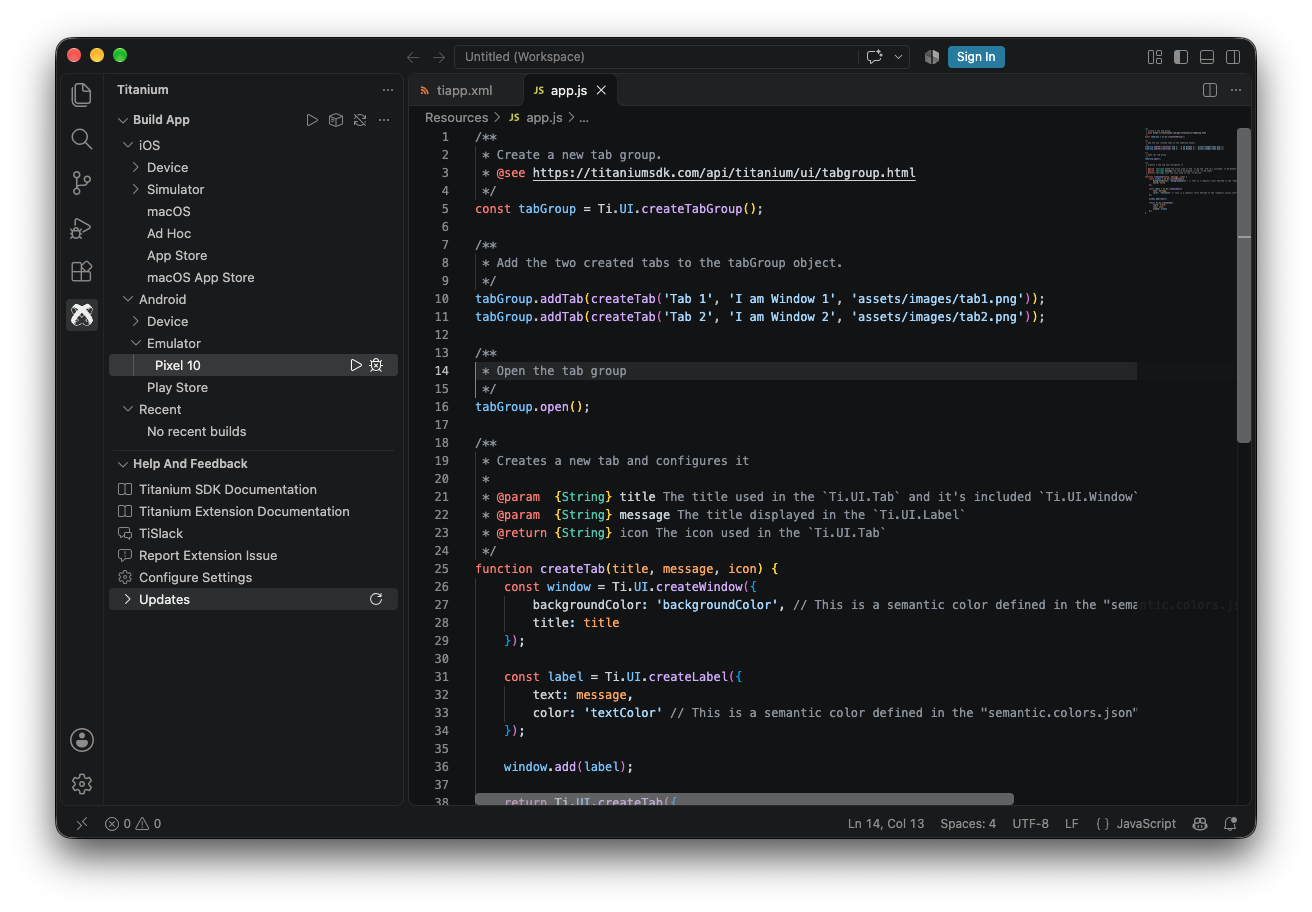
Titanium: Build starts a build and Titanium: Stop ends one.
| Command | macOS | Windows and Linux |
|---|---|---|
Titanium: Build |
cmd alt enter |
ctrl alt enter |
Titanium: Stop |
cmd alt . |
ctrl alt . |
Titanium: Open related view |
cmd alt v |
ctrl alt v |
Titanium: Open related style |
cmd alt s |
ctrl alt s |
Titanium: Open related controller |
cmd alt x |
ctrl alt x |
Titanium: Open related files |
cmd alt a |
ctrl alt a |
The three "open related" commands move between an Alloy controller, its view and its style without going through the file tree.
Titanium: Generate Alloy controller and its siblings write models, views,
styles, widgets and migrations where Alloy expects them.
Titanium: Create application, Titanium: Create module and
Titanium: Create keystore wrap the CLI's creation commands, and
Titanium: Fix environment issues reports what your machine is missing.
The extension contributes a titanium debug type, so you can set breakpoints in
your JavaScript and step through a running app rather than reading log output.
Settings worth knowing
Important
titanium.general.displayBuildCommandInConsole defaults to true, and the
command it writes to the output channel includes password arguments. Turn it
off before sharing your screen, recording a build, or pasting output into an
issue.
{
  "titanium.general.displayBuildCommandInConsole": false,
  "titanium.build.liveview": true,
  "titanium.general.logLevel": "info",
  "titanium.android.keystorePath": "/Users/you/keystores/myapp.keystore",
  "titanium.android.keystoreAlias": "myapp"
}
titanium.build.liveview is on by default and reloads the running app when you
save. The two keystore settings save re-entering the path and alias on every
Android package build; the password is asked for each time and is not stored
here.
Pulsar
Pulsar is the community-maintained continuation of
Atom, which GitHub retired in December 2022. The Titanium package for it is
titanium, maintained at
tidev/pulsar-titanium.
Install it from Pulsar: Preferences or Settings, then Install, then
search for titanium.
Or from a terminal:
pulsar --package install pulsar-titaniumWhat it adds
A toolbar across the top of the editor, which is the main difference from the VS Code extension. It carries the build and run control, platform and target selectors, code signing and keystore configuration, a LiveView toggle, an info panel for the active project, the component generator, and the console toggle.
| Command | Keymap | What it does |
|---|---|---|
appc:build |
ctrl alt enter |
Build with the selected configuration |
appc:stop |
None | Stop the running build |
appc:console |
None | Toggle the console |
appc:generate |
None | Generate an Alloy file or component |
appc:take-screenshot |
None | Screenshot the running device |
appc:clean |
ctrl alt k |
Clean the project directory |
appc:open view |
ctrl alt v |
Open the related Alloy XML file |
appc:open style |
ctrl alt s |
Open the related TSS file |
appc:open controller |
ctrl alt x |
Open the related JavaScript file |
appc:open close related |
ctrl alt a |
Toggle all three related files |
Note
The appc: prefix is left over from Appcelerator and does not mean the
package needs the retired appc CLI. Enable Use ti commands in the
package settings so builds run through the Titanium CLI.
The package also provides autocomplete and hyperclick, so Alloy identifiers resolve to the file that defines them.
Like the VS Code extension, the console prints the command it is running by default. Those commands carry signing credentials on distribution builds, so turn it off in the package settings before sharing your screen.
JetBrains IDEs
Note
This one is a community project, not TiDev's. devloopsnet/titanium-jetbrains maintains it, Apache-2.0, and its Marketplace listing is from an unverified vendor. It is young: first released in July 2026.
The plugin is Titanium on the
JetBrains Marketplace.
Install it from your IDE: Settings, then Plugins, then Marketplace,
and search for Titanium.
It needs a 2024.3 or newer IntelliJ-Platform IDE, and it is a port of the VS Code extension, so most of what that does has an equivalent here.
What it adds
Builds run as an IDE run configuration rather than a command, so the usual
run and stop controls drive them and tiapp.xml is what marks a folder as a
Titanium project. There is a build-explorer tool window, ti create wizards for
apps and modules wired into File, New, Project, the Alloy generators, and
SDK install and update management.
Editor support goes further than the other two in one place: .tss gets real
highlighting and completion rather than being mapped onto CSS, Alloy views get
XML completion, and related controller, view and style files are reachable from
gutter markers.
Tip
It runs on every IntelliJ-Platform IDE, including the free Community editions and Android Studio. JavaScript completion inside Alloy controllers is the one part that needs the bundled JavaScript plugin, so it appears on WebStorm, IDEA Ultimate, PhpStorm and PyCharm Professional and is absent elsewhere. Everything else works either way.
The debugger connects over the Chrome DevTools Protocol and handles breakpoints,
stepping and local variables. It is experimental: expression evaluation and
source-map fidelity are not finished, and iOS additionally needs
ios-webkit-debug-proxy.
One thing it does better than the VS Code extension: it echoes the build command
to the console with passwords masked, so the warning above about
displayBuildCommandInConsole has no equivalent here.
Other editors
There is no Titanium package for any other editor, and the Atom package is not an option: Atom itself is gone, and Pulsar is where that work continued.
JavaScript works everywhere and Alloy views are XML. The one gap is TSS. If
your editor lets you map an extension to a language, point .tss at CSS and
styles will highlight sensibly.
Build from a terminal:
ti build --platform androidNext
Your first app creates a project and builds it.