Platform conventions
Written for Titanium SDK 13.4.0 and later
Titanium gives you one layout system and one API, and most of a screen is the same on both platforms. This page is for the places where that stops being true - where the platforms differ in approach rather than in a property name, and where writing one behaviour for both produces an app that feels wrong on one of them.
Small differences are noted on the page they belong to. These are the structural ones.
Navigating between screens
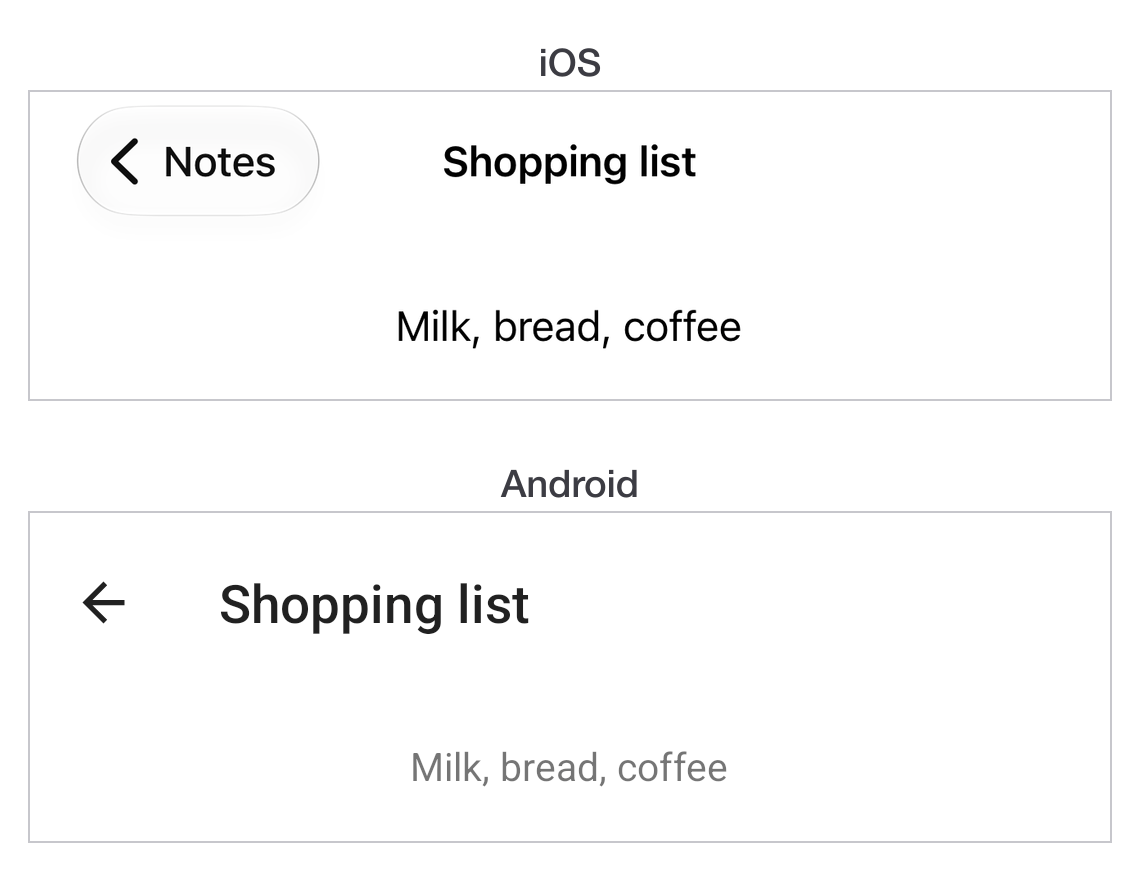
iOS stacks windows. A NavigationWindow owns a stack, pushes a window on
with openWindow and pops it with closeWindow, and draws a back button in
the bar automatically.
Android stacks activities. Opening a window starts an activity, the hardware or gesture back closes it, and there is no navigation container to create.
const android = Ti.Platform.osname === 'android';

const root = Ti.UI.createWindow({ title: 'List', backgroundColor: 'white' });
const nav = android ? null : Ti.UI.createNavigationWindow({ window: root });

/** Opens a screen the way the platform expects. The one place that branches. */
function push(win) {
  if (nav) {
    nav.openWindow(win);
  } else {
    win.open();
  }
}

const open = Ti.UI.createButton({ title: 'Open detail' });
open.addEventListener('click', () => {
  push(Ti.UI.createWindow({ title: 'Detail', backgroundColor: 'white' }));
});
root.add(open);

(nav ?? root).open();
One push rather than a platform check at every call site.
Important
NavigationWindow exists on Android too, but using it there gives you an
iOS-shaped navigation inside an activity, and the system back button then
does not do what a user expects. Let Android use its own stack.
The back button
Android has one and iOS does not. That is a real difference in what a user can do, not a styling choice.
const win = Ti.UI.createWindow({ backgroundColor: 'white' });
let unsaved = true;

win.addEventListener('androidback', () => {
  if (!unsaved) {
    win.close();
    return;
  }
  const ask = Ti.UI.createAlertDialog({
    message: 'Discard changes?',
    buttonNames: ['Cancel', 'Discard'],
    cancel: 0
  });
  ask.addEventListener('click', (e) => {
    if (e.index === 1) {
      unsaved = false;
      win.close();
    }
  });
  ask.show();
});

win.open();
Adding an androidback listener replaces the default behaviour, so the window
no longer closes unless you close it. That is the point of the event, and it is
also the way to leave a user trapped on a screen if you forget the other
branch.
The last window closing exits the app on Android. exitOnClose on the root
window controls that.
Title bars
iOS has a navigation bar owned by the stack; Android has an action bar owned by the activity. They take different properties.
| iOS | Android | |
|---|---|---|
| Title | Window.title |
Window.title |
| Custom view | Window.titleControl |
ActionBar.customView |
| Hide it | Window.navBarHidden |
ActionBar.hide() |
| Back affordance | Automatic | ActionBar.displayHomeAsUp |
Window.title is the one that works on both, which is why it is worth
building screens that need nothing more.
Tabs
TabGroup is the same object on both platforms and lands in different places:
a bottom tab bar on iOS, and tabs the platform places according to its own
version on Android. Both are correct for their platform.
The thing not to do is force one. An app with iOS-style bottom tabs on Android reads as a port.
Three to five tabs. Both platforms handle more badly, in different ways.
Menus and actions
iOS puts secondary actions in the navigation bar or a toolbar. Android has an options menu in the action bar's overflow.
There is no shared abstraction over the two. Either put the action somewhere that exists on both - a button in the content - or write the platform-specific version of each and pick with a check.
Safe areas and system bars
iOS content runs under the notch and the home indicator unless told otherwise.
extendSafeArea on the window controls it, and defaults to letting the system
inset your content.
Android draws behind the status bar in some themes and not others. Set
theme on the window to choose.
Test both on hardware with a notch or a cutout. A simulator in the default device rarely shows the problem.
Which platform am I on
if (Ti.Platform.osname === 'android') { /* ... */ }Ti.Platform.osname is 'android', 'iphone' or 'ipad' - so a test for iOS
has to accept two values. In Alloy, OS_IOS and OS_ANDROID are compile-time
constants and the branch not taken is removed from the build rather than
evaluated at runtime.
In TSS and XML, a platform attribute does the same:
<Alloy>
  <Window>
    <Button platform="android" title="Android only" />
  </Window>
</Alloy>
Prefer those to a runtime check when the difference is layout rather than behaviour: the code for the other platform never ships.
Next
Working with data covers storing things between launches.