You are reading 13.3.0. See this page in 13.4.1.
Titanium.UI.RefreshControl
Extends Titanium.Proxy
The RefreshControl is a representation of the native iOS UIRefreshControl and Android SwipeRefreshLayout.
| Android | iOS |
|---|---|
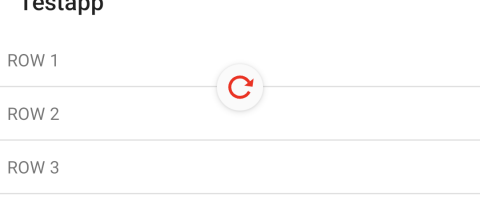 |
You use a RefreshControl with a Titanium.UI.TableView, Titanium.UI.ListView or Titanium.UI.ScrollView object.
It provides an alternate method to implement pull to refresh functionality provided by
Titanium.UI.TableView.headerPullView and Titanium.UI.ListView.pullView properties.
Use the Titanium.UI.createRefreshControl method to create a RefreshControl.
Important iOS 10+ Note: If you use the RefreshControl inside a Titanium.UI.Window that has the largeTitleEnabled property
set to true, you also need to set the extendEdges property to either [Ti.UI.EXTEND_EDGE_TOP] or [Ti.UI.EXTEND_EDGE_ALL]
in order to prevent a flickering of the refresh spinner. In Titanium SDK 8+, the extendEdges property will be set to [Ti.UI.EXTEND_EDGE_ALL]
by default to match the native behavior.
Examples
Basic Pull To Refresh
A basic sample showing the usage of refreshstart event with endRefreshing functionality.
const win = Ti.UI.createWindow();
let counter = 0;
function genData() {
    const data = [];
    for (let i = 1; i <= 3; i++) {
        data.push({ properties:{ title: `ROW ${counter + i}` } });
    }
    counter += 3;
    return data;
}
const section = Ti.UI.createListSection();
section.items = genData();
const control = Ti.UI.createRefreshControl({
    tintColor: 'red'
});
const listView = Ti.UI.createListView({
    sections: [section],
    refreshControl: control
});
control.addEventListener('refreshstart', () => {
    Ti.API.info('refreshstart');
    setTimeout(() => {
        Ti.API.debug('Timeout');
        section.appendItems(genData());
        control.endRefreshing();
    }, 2000);
});
win.add(listView);
win.open();
Alloy example
TableView with a RefreshControl
<Alloy>
    <Window>
        <TableView id="table">
          <RefreshControl id="refresh" onRefreshstart="refreshstart"/>
            <TableViewSection id="sectionFruit" headerTitle="Fruit">
                <TableViewRow title="Apple"/>
                <TableViewRow title="Bananas"/>
            </TableViewSection>
        </TableView>
    </Window>
</Alloy>
function refreshstart(e){
$.refresh.endRefreshing();
}
$.index.open();Properties 7
Inherited from Titanium.Proxy
The name of the API that this proxy corresponds to.
The background color for the refresh control, as a color name or hex triplet.
For information about color values, see the "Colors" section of Titanium.UI.
Inherited from Titanium.Proxy
Indicates if the proxy will bubble an event to its parent.
Default: true
Inherited from Titanium.Proxy
The Window or TabGroup whose Activity lifecycle should be triggered on the proxy.
Offset of the refresh control view.
The tint color for the refresh control, as a color name or hex triplet.
For information about color values, see the "Colors" section of Titanium.UI.
The attributed title of the control.
Title text is only supported on iOS. Android will ignore this property.
Methods 6
Inherited from Titanium.Proxy
Adds the specified callback as an event listener for the named event.
| Parameters | Type | Description |
|---|---|---|
| name | String | Name of the event. |
| callback | Callback<Titanium.Event> | Callback function to invoke when the event is fired. 4 fields
|
applyProperties
since 3.0.0Inherited from Titanium.Proxy
Applies the properties to the proxy.
| Parameters | Type | Description |
|---|---|---|
| props | Dictionary | A dictionary of properties to apply. |
Tells the control that a refresh operation was started programmatically.
Call this method when an external event source triggers a programmatic refresh of your table. This method updates the state of the refresh control to reflect the in-progress refresh operation. When the refresh operation ends, be sure to call the endRefreshing method to return the control to its default state. Note: When triggering the refreshing programmatically, the styling is not applied and the refresh control is tinted in the native gray.
Tells the control that a refresh operation has ended.
Call this method at the end of any refresh operation (whether it was initiated programmatically or by the user) to return the refresh control to its default state.
Inherited from Titanium.Proxy
Fires a synthesized event to any registered listeners.
| Parameters | Type | Description |
|---|---|---|
| name | String | Name of the event. |
| event? | Dictionary | A dictionary of keys and values to add to the Titanium.Event object sent to the listeners. |
Inherited from Titanium.Proxy
Removes the specified callback as an event listener for the named event.
| Parameters | Type | Description |
|---|---|---|
| name | String | Name of the event. |
| callback | Callback<Titanium.Event> | Callback function to remove. Must be the same function passed to 4 fields
|
Events 2
refreshend
since Android 6.2.0, iPhone 6.0.0, iPad 6.0.0Fired in response to a user finished action to refresh the contents of the table view, list view or scroll view.
| Event properties | Type | Description |
|---|---|---|
| bubbles | Boolean | This is false. This event does not bubble |
refreshstart
since Android 6.2.0, iPhone 3.2.0, iPad 3.2.0Fired in response to a user initiated an action to refresh the contents of the table view, list view or scroll view.
| Event properties | Type | Description |
|---|---|---|
| bubbles | Boolean | This is false. This event does not bubble |