You are reading 12.6.2. See this page in 13.4.1.
Titanium.UI.iOS.Stepper
Extends Titanium.UI.ViewTitanium.Proxy
A widget used to increment and decrement a value.
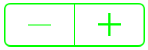
| Default | Custom |
|---|---|
 |
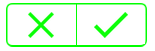 |
A Stepper displays its selected state while it is being pressed.
You can specify background images for each state on iOS.
Use the Titanium.UI.iOS.createStepper method or a <Stepper> Alloy element to create a stepper
(see the "Examples" section details).
-
When assigning a custom image to the
backgroundImageproperty, the image must be partially or wholly transparent for the background color or background gradient to be visible. -
Similarly, for an assigned background gradient to show through, the
backgroundColormay need to be set to 'transparent'. -
Note that the stepper cannot be re-sized.
Examples
Simple Stepper Example
var win = Ti.UI.createWindow({
    backgroundColor: '#fff'
});

var stepper = Ti.UI.iOS.createStepper({
    tintColor: "green",
    steps: 3,
    maximum: 30,
    minimum: 0
});

stepper.addEventListener("change", function(e) {
    Ti.API.info(e.value);
});

win.add(stepper);
win.open();
Alloy XML Markup
Previous example as an Alloy view.
stepper.xml:
<Alloy>
    <Window id="window">
        <Stepper id="stepper" onClick="doClick" tintColor="green" steps="3" />
    </Window>
</Alloy>
stepper.js:
function doClick(e) {
    alert(e.value);
}

$.window.open();
Properties 57
Inherited from Titanium.UI.View
Whether the view should be "hidden" from (i.e., ignored by) the accessibility service.
Default: false
Inherited from Titanium.UI.View
Briefly describes what performing an action (such as a click) on the view will do.
Default: null
Inherited from Titanium.UI.View
A succint label identifying the view for the device's accessibility service.
Inherited from Titanium.UI.View
A string describing the value (if any) of the view for the device's accessibility service.
Inherited from Titanium.UI.View
Coordinate of the view about which to pivot an animation.
Inherited from Titanium.UI.View
Current position of the view during an animation.
Inherited from Titanium.Proxy
The name of the API that this proxy corresponds to.
autorepeat
BooleanIf YES, the user pressing and holding on the stepper repeatedly alters value. The default value is YES.
backgroundColor
String | Titanium.UI.ColorInherited from Titanium.UI.View
Background color of the view, as a color name or hex triplet.
Inherited from Titanium.UI.View
A background gradient for the view.
Linear and Radial Gradients
The following code excerpt creates two views, one with a linear gradient and one with a radial gradient.
var win1 = Titanium.UI.createWindow({
    title:'Tab 1',
    backgroundColor:'#fff',
    layout: 'vertical'
});

var radialGradient = Ti.UI.createView({
    top: 10,
    width: 100,
    height: 100,
    backgroundGradient: {
        type: 'radial',
        startPoint: { x: 50, y: 50 },
        endPoint: { x: 50, y: 50 },
        colors: [ 'red', 'blue'],
        startRadius: 50,
        endRadius: 0,
        backfillStart: true
    }
});
var linearGradient = Ti.UI.createView({
    top: 10,
    width: 100,
    height: 100,
    backgroundGradient: {
        type: 'linear',
        startPoint: { x: '0%', y: '50%' },
        endPoint: { x: '100%', y: '50%' },
        colors: [ { color: 'red', offset: 0.0}, { color: 'blue', offset: 0.25 }, { color: 'red', offset: 1.0 } ],
    }
});
win1.add(radialGradient);
win1.add(linearGradient);
win1.open();
backgroundImage
StringBackground image for the stepper in its normal state, specified as a local file path or URL.
Also sets the background image for other stepper states (focused, selected), unless they've been specified explicitly. On iOS, if backgroundDisabledImage is unset, the image will appear faded to indicate being disabled. Also on iOS, if backgroundSelectedImage is unset, the image will be darkened to indicate being selected.
backgroundLeftCap
NumberInherited from Titanium.UI.View
Size of the left end cap.
Default: 0
backgroundRepeat
BooleanInherited from Titanium.UI.View
Determines whether to tile a background across a view.
Default: false
backgroundTopCap
NumberInherited from Titanium.UI.View
Size of the top end cap.
Default: 0
borderColor
String | Titanium.UI.ColorInherited from Titanium.UI.View
Border color of the view, as a color name or hex triplet.
borderRadius
Number | String | Array<Number> | Array<String>Inherited from Titanium.UI.View
Radius for the rounded corners of the view's border.
Default: 0
borderWidth
NumberInherited from Titanium.UI.View
Border width of the view.
Default: 0
bottom
Number | StringInherited from Titanium.UI.View
View's bottom position, in platform-specific units.
Inherited from Titanium.Proxy
Indicates if the proxy will bubble an event to its parent.
Default: true
Inherited from Titanium.UI.View
View's center position, in the parent view's coordinates.
Inherited from Titanium.UI.View
View's clipping behavior.
continuous
BooleanIf YES, value change events are sent immediately when the value changes during user interaction. If NO, a value change event is sent when user interaction ends. The default value is YES.
decrementDisabledImage
StringBackground image for the stepper decrement button in its disabled state, specified as a local file path or URL. The decrement button enters a disabled state ones the value is equal to the minimumValue , setting the enabled property to false will have no effect to decrement button state.
decrementImage
StringBackground image for the stepper decrement button in its normal state, specified as a local file path or URL.
Also sets the background image for the other stepper states (disabled, focused, selected), unless they've been specified explicitly, except for iOS, which requires a backgroundImage.
enabled
BooleanDetermines if the stepper is enabled or disabled.
height
Number | StringInherited from Titanium.UI.View
View height, in platform-specific units.
Inherited from Titanium.UI.View
Adds a horizontal parallax effect to the view
Inherited from Titanium.UI.View
Determines whether the layout has wrapping behavior.
Default: true
id
StringInherited from Titanium.UI.View
View's identifier.
incrementDisabledImage
StringBackground image for the stepper increment button in its disabled state, specified as a local file path or URL.The increment button enters a disabled state ones the value is equal to the maximumValue , setting the enabled property to false will have no effect to increment button state.
incrementImage
StringBackground image for the stepper increment button in its normal state, specified as a local file path or URL.
Also sets the background image for the other stepper states (disabled, focused, selected), unless they've been specified explicitly, except for iOS, which requires a backgroundImage.
layout
StringInherited from Titanium.UI.View
Specifies how the view positions its children. One of: 'composite', 'vertical', or 'horizontal'.
left
Number | StringInherited from Titanium.UI.View
View's left position, in platform-specific units.
maximum
NumberThe maximum value the stepper will be set to, the value must be greater than the minimum value. If you attempt to set a value equal to or lower than minimum, the system will default the value to 100.
minimum
NumberThe minimum value the stepper will be set to, the value must be smaller than the maximum value. If you attempt to set a value equal to or greater than maximum, the system will default the value to 0.
opacity
NumberInherited from Titanium.UI.View
Opacity of this view, from 0.0 (transparent) to 1.0 (opaque). Defaults to 1.0 (opaque).
Inherited from Titanium.UI.View
The preview context used in the 3D-Touch feature "Peek and Pop".
Inherited from Titanium.UI.View
Background color of the wrapper view when this view is used as either Titanium.UI.ListView.pullView or Titanium.UI.TableView.headerPullView.
Defaults to undefined. Results in a light grey background color on the wrapper view.
Inherited from Titanium.UI.View
The bounding box of the view relative to its parent, in system units.
right
Number | StringInherited from Titanium.UI.View
View's right position, in platform-specific units.
Inherited from Titanium.UI.View
Clockwise 2D rotation of the view in degrees.
Inherited from Titanium.UI.View
The size of the view in system units.
steps
NumberThe value the stepper will increment and decrement by, default value for this property is 1. When setting a new value, it must be greater than 1.
tintColor
String | Titanium.UI.ColorSets the color for the widget, any backgroundImages added will be set to the same color.
For information about color values, see the "Colors" section of Titanium.UI.
Inherited from Titanium.UI.View
The default text to display in the control's tooltip.
top
Number | StringInherited from Titanium.UI.View
The view's top position.
touchEnabled
BooleanInherited from Titanium.UI.View
Determines whether view should receive touch events.
Default: true
Inherited from Titanium.UI.View
Transformation matrix to apply to the view.
Default: Identity matrix
value
NumberThe current value of the stepper.
Inherited from Titanium.UI.View
Adds a vertical parallax effect to the view
viewShadowColor
String | Titanium.UI.Colorsince Android 11.1.0, iPhone 3.3.0, iPad 3.3.0, macOS 9.2.0Inherited from Titanium.UI.View
Determines the color of the shadow.
Inherited from Titanium.UI.View
Determines the offset for the shadow of the view.
Inherited from Titanium.UI.View
Determines the blur radius used to create the shadow.
visible
BooleanInherited from Titanium.UI.View
Determines whether the view is visible.
Default: true
width
Number | StringInherited from Titanium.UI.View
View's width, in platform-specific units.
wraps
BooleanIf YES, incrementing beyond Titanium.UI.iOS.Stepper.maximum sets value to Titanium.UI.iOS.Stepper.minimum. likewise, decrementing below Titanium.UI.iOS.Stepper.minimum sets value to Titanium.UI.iOS.Stepper.maximum. If NO, the stepper does not increment beyond Titanium.UI.iOS.Stepper.maximum nor does it decrement below Titanium.UI.iOS.Stepper.minimum but rather holds at those values. The default value is NO.
zIndex
NumberInherited from Titanium.UI.View
Z-index stack order position, relative to other sibling views.
Methods 12
Inherited from Titanium.Proxy
Adds the specified callback as an event listener for the named event.
| Parameters | Type | Description |
|---|---|---|
| name | String | Name of the event. |
| callback | Callback<Titanium.Event> | Callback function to invoke when the event is fired. 4 fields
|
Inherited from Titanium.UI.View
Animates this view.
| Parameters | Type | Description |
|---|---|---|
| animation | Titanium.UI.Animation | Dictionary<Titanium.UI.Animation> | Either a dictionary of animation properties or an Animation object. |
| callback? | Callback<Object> | Function to be invoked upon completion of the animation. |
applyProperties
since 3.0.0Inherited from Titanium.Proxy
Applies the properties to the proxy.
| Parameters | Type | Description |
|---|---|---|
| props | Dictionary | A dictionary of properties to apply. |
clearMotionEffects
since 8.2.0Inherited from Titanium.UI.View
Removes all previously added motion effects.
convertPointToView
since Android 1.8, iPhone 1.8, iPad 1.8, macOS 9.2.0Inherited from Titanium.UI.View
Translates a point from this view's coordinate system to another view's coordinate system.
| Parameters | Type | Description |
|---|---|---|
| point | Point | A point in this view's coordinate system. If this argument is missing an |
| destinationView | Titanium.UI.View | View that specifies the destination coordinate system to convert to. If this argument is not a view, an exception will be raised. |
Inherited from Titanium.Proxy
Fires a synthesized event to any registered listeners.
| Parameters | Type | Description |
|---|---|---|
| name | String | Name of the event. |
| event? | Dictionary | A dictionary of keys and values to add to the Titanium.Event object sent to the listeners. |
getViewById
since 6.1.0Inherited from Titanium.UI.View
Returns the matching view of a given view ID.
| Parameters | Type | Description |
|---|---|---|
| id | String | The ID of the view that should be returned. Use the |
Inherited from Titanium.UI.View
Hides this view.
| Parameters | Type | Description |
|---|---|---|
| options? | AnimatedOptions | Animation options for Android only. Since SDK 5.1.0 and used only on Android 5.0+ Determines whether to enable a circular reveal animation.
Note that the default here is equivalent to passing in |
insertAt
since 3.3.0Inherited from Titanium.UI.View
Inserts a view at the specified position in the children array.
| Parameters | Type | Description |
|---|---|---|
| params | ViewPositionOptions | Pass an object that specifies the view to insert and optionally at which position (defaults to end) 2 fields
|
Inherited from Titanium.Proxy
Removes the specified callback as an event listener for the named event.
| Parameters | Type | Description |
|---|---|---|
| name | String | Name of the event. |
| callback | Callback<Titanium.Event> | Callback function to remove. Must be the same function passed to 4 fields
|
Inherited from Titanium.UI.View
Makes this view visible.
| Parameters | Type | Description |
|---|---|---|
| options? | AnimatedOptions | Animation options for Android only. Since SDK 5.1.0 and only used on Android 5.0+ Determines whether to enable a circular reveal animation.
Note that the default here is equivalent to passing in |
Inherited from Titanium.UI.View
Returns an image of the rendered view, as a Blob.
| Parameters | Type | Description |
|---|---|---|
| callback? | Callback<Titanium.Blob> | Function to be invoked upon completion. If non-null, this method will be performed asynchronously. If null, it will be performed immediately. |
| honorScaleFactor? | Boolean | Determines whether the image is scaled based on scale factor of main screen. (iOS only) When set to true, image is scale factor is honored. When set to false, the image in the blob has the same dimensions for retina and non-retina devices. |
Events 7
Fired every time the stepper value changes.
| Event properties | Type | Description |
|---|---|---|
| value | Number | The current value of the stepper. |
| minimum | Number | The minimum value of the stepper. |
| maximum | Number | The maximum value of the stepper. |
Inherited from Titanium.UI.View
Fired when the device detects a click against the view.
| Event properties | Type | Description |
|---|---|---|
| x | Number | X coordinate of the event from the |
| y | Number | Y coordinate of the event from the |
| obscured | Boolean | Returns This is a security feature to protect an app from "tapjacking", where a malicious app can use a system overlay to intercept touch events in your app or to trick the end-user to tap on UI in your app intended for the overlay. |
Inherited from Titanium.UI.View
Fired when the device detects a double click against the view.
| Event properties | Type | Description |
|---|---|---|
| x | Number | X coordinate of the event from the |
| y | Number | Y coordinate of the event from the |
| obscured | Boolean | Returns This is a security feature to protect an app from "tapjacking", where a malicious app can use a system overlay to intercept touch events in your app or to trick the end-user to tap on UI in your app intended for the overlay. |
Inherited from Titanium.UI.View
Fired when a touch event is interrupted by the device.
| Event properties | Type | Description |
|---|---|---|
| x | Number | X coordinate of the event from the |
| y | Number | Y coordinate of the event from the |
| force | Number | The current force value of the touch event. Note: This property is only available for iOS devices that support 3D-Touch and run 9.0 or later and on some Android devices. |
| size | Number | The current size of the touch area. Note: This property is only available on some Android devices. |
| maximumPossibleForce | Number | Maximum possible value of the force property. Note: This property is only available for iOS devices that support 3D-Touch and run 9.0 or later. |
| altitudeAngle | Number | A value which indicates the stylus angle on the screen. If the stylus is perpendicular to the screen or no stylus is being used, the value will be Pi/2. If the stylus is parallel to the screen, the value will be 0. Note: This property is only available for iOS devices that support 3D-Touch and are 9.1 or later. |
| timestamp | Number | The time (in seconds) when the touch was used in correlation with the system start up. Note: This property is only available for iOS devices that support 3D-Touch and run 9.0 or later. |
| azimuthUnitVectorInViewX | Number | The x value of the unit vector that points in the direction of the azimuth of the stylus. Note: This property is only available for iOS devices that support the Apple Pencil and are 9.1 or later. |
| azimuthUnitVectorInViewY | Number | The y value of the unit vector that points in the direction of the azimuth of the stylus. Note: This property is only available for iOS devices that support the Apple Pencil and are 9.1 or later. |
| obscured | Boolean | Returns This is a security feature to protect an app from "tapjacking", where a malicious app can use a system overlay to intercept touch events in your app or to trick the end-user to tap on UI in your app intended for the overlay. |
Inherited from Titanium.UI.View
Fired when a touch event is completed.
| Event properties | Type | Description |
|---|---|---|
| x | Number | X coordinate of the event from the |
| y | Number | Y coordinate of the event from the |
| force | Number | The current force value of the touch event. Note: This property is only available for iOS devices that support 3D-Touch and run 9.0 or later and on some Android devices. |
| size | Number | The current size of the touch area. Note: This property is only available on some Android devices. |
| maximumPossibleForce | Number | Maximum possible value of the force property. Note: This property is only available for iOS devices that support 3D-Touch and run 9.0 or later. |
| altitudeAngle | Number | A value which indicates the stylus angle on the screen. If the stylus is perpendicular to the screen or no stylus is being used, the value will be Pi/2. If the stylus is parallel to the screen, the value will be 0. Note: This property is only available for iOS devices that support 3D-Touch and are 9.1 or later. |
| timestamp | Number | The time (in seconds) when the touch was used in correlation with the system start up. Note: This property is only available for iOS devices that support 3D-Touch and run 9.0 or later. |
| azimuthUnitVectorInViewX | Number | The x value of the unit vector that points in the direction of the azimuth of the stylus. Note: This property is only available for iOS devices that support the Apple Pencil and are 9.1 or later. |
| azimuthUnitVectorInViewY | Number | The y value of the unit vector that points in the direction of the azimuth of the stylus. Note: This property is only available for iOS devices that support the Apple Penciland are 9.1 or later. |
| obscured | Boolean | Returns This is a security feature to protect an app from "tapjacking", where a malicious app can use a system overlay to intercept touch events in your app or to trick the end-user to tap on UI in your app intended for the overlay. |
Inherited from Titanium.UI.View
Fired as soon as the device detects movement of a touch.
| Event properties | Type | Description |
|---|---|---|
| x | Number | X coordinate of the event from the |
| y | Number | Y coordinate of the event from the |
| force | Number | The current force value of the touch event. Note: This property is only available for iOS devices that support 3D-Touch and run 9.0 or later and on some Android devices. |
| size | Number | The current size of the touch area. Note: This property is only available on some Android devices. |
| maximumPossibleForce | Number | Maximum possible value of the force property. Note: This property is only available for iOS devices that support 3D-Touch and run 9.0 or later. |
| altitudeAngle | Number | A value which indicates the stylus angle on the screen. If the stylus is perpendicular to the screen or no stylus is being used, the value will be Pi/2. If the stylus is parallel to the screen, the value will be 0. Note: This property is only available for iOS devices that support 3D-Touch and are 9.1 or later. |
| timestamp | Number | The time (in seconds) when the touch was used in correlation with the system start up. Note: This property is only available for iOS devices that support 3D-Touch and run 9.0 or later. |
| azimuthUnitVectorInViewX | Number | The x value of the unit vector that points in the direction of the azimuth of the stylus. Note: This property is only available for iOS devices that support the Apple Pencil and are 9.1 or later. |
| azimuthUnitVectorInViewY | Number | The y value of the unit vector that points in the direction of the azimuth of the stylus. Note: This property is only available for iOS devices that support the Apple Pencil and are 9.1 or later. |
| obscured | Boolean | Returns This is a security feature to protect an app from "tapjacking", where a malicious app can use a system overlay to intercept touch events in your app or to trick the end-user to tap on UI in your app intended for the overlay. |
Inherited from Titanium.UI.View
Fired as soon as the device detects a touch gesture.
| Event properties | Type | Description |
|---|---|---|
| x | Number | X coordinate of the event from the |
| y | Number | Y coordinate of the event from the |
| force | Number | The current force value of the touch event. Note: This property is only available for iOS devices that support 3D-Touch and run 9.0 or later and on some Android devices. |
| size | Number | The current size of the touch area. Note: This property is only available on some Android devices. |
| maximumPossibleForce | Number | Maximum possible value of the force property. Note: This property is only available for iOS devices that support 3D-Touch and run 9.0 or later. |
| altitudeAngle | Number | A value which indicates the stylus angle on the screen. If the stylus is perpendicular to the screen or no stylus is being used, the value will be Pi/2. If the stylus is parallel to the screen, the value will be 0. Note: This property is only available for iOS devices that support 3D-Touch and are 9.1 or later. |
| timestamp | Number | The time (in seconds) when the touch was used in correlation with the system start up. Note: This property is only available for iOS devices that support 3D-Touch and run 9.0 or later. |
| azimuthUnitVectorInViewX | Number | The x value of the unit vector that points in the direction of the azimuth of the stylus. Note: This property is only available for iOS devices that support the Apple Pencil and are 9.1 or later. |
| azimuthUnitVectorInViewY | Number | The y value of the unit vector that points in the direction of the azimuth of the stylus. Note: This property is only available for iOS devices that support the Apple Pencil and are 9.1 or later. |
| obscured | Boolean | Returns This is a security feature to protect an app from "tapjacking", where a malicious app can use a system overlay to intercept touch events in your app or to trick the end-user to tap on UI in your app intended for the overlay. |