You are reading 12.6.2. See this page in 13.4.1.
Titanium.UI.Picker
Extends Titanium.UI.ViewTitanium.Proxy
A control used to select one or more fixed values.
| Android | iOS |
|---|---|
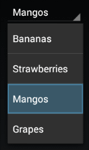 |
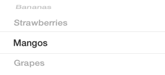 |
Use the Titanium.UI.createPicker method or Alloy <Picker> element to create a picker control.
On Android, the useSpinner property must be enabled to support multiple columns.
By default, the spinner is automatically sized to fit its content and can overflow
to additional spinner rows. The size of the picker can be adjusted with the width
and height properties, but may omit picker columns or cut off picker rows
if the size is set too small. This property is deprecated. Please use the default
Android native "dropdown" style by not setting useSpinner to true.
On iOS, the height property is only available in iOS 9 and later.
By default, the size of the picker, including its background, is fixed at the
same height as the iPhone keyboard to respect the
iOS Human Interface Guidelines.
The default width on iOS is 320px and the height is 228px.
The contents of the picker are sized to fit the picker, which may cut off text
in the picker rows. Adding views to picker rows is also supported on iOS.
On iPad, Apple recommends using a picker only in a popover. Since the size of the picker cannot be adjusted, it is not suitable for the main screen.
Note: you can only set the columns property for the plain picker.
If you set the type property to anything else except
Titanium.UI.PICKER_TYPE_PLAIN, you cannot modify the picker's columns.
Examples
Multi-Column Picker using Alloy XML Markup
Creates a picker with two columns. You can optionally use Column and Row as shorthand
notation for PickerColumn and PickerRow, respectively.
app/views/index.xml:
<Alloy>
    <Window id="win" backgroundColor="white" layout="vertical" exitOnClose="true">
        <Picker id="picker" top="50" selectionIndicator="true" useSpinner="true">
            <PickerColumn id="column1">
                <PickerRow title="Bananas"/>
                <PickerRow title="Strawberries"/>
                <PickerRow title="Mangos"/>
                <PickerRow title="Grapes"/>
            </PickerColumn>
            <!-- Picker shorthand notation -->
            <Column id="column2">
                <Row title="red"/>
                <Row title="green"/>
                <Row title="blue"/>
                <Row title="orange"/>
            </Column>
        </Picker>
    </Window>
</Alloy>app/controllers/index.js:
$.win.open();Date Picker using Alloy XML Markup
Creates a date picker, then monitors the change event to see when the user updates the picker.
For the date string, use string values accepted by the moment.js constructor in the XML and TSS files. If you are defining dates in the controller code, use a JavaScript Date object.
app/views/index.xml:
<Alloy>
    <Window backgroundColor="blue">
        <Picker id="picker"
          onChange="report"
          type="Ti.UI.PICKER_TYPE_DATE"
          minDate="2014,4,1"
          maxDate="May 1, 2014 12:00:00"
          value="2014-04-15T12:00:00">
        </Picker>
    </Window>
</Alloy>app/controllers/index.js:
function report(e) {
    Ti.API.info('User selected: ' + e.value);
}

$.index.open();
Basic Single Column Picker
Create a one-column, platform-specific style, picker and automatically select a row.
Ti.UI.backgroundColor = 'white';
var win = Ti.UI.createWindow({
  exitOnClose: true,
  layout: 'vertical'
});

var picker = Ti.UI.createPicker({
  top:50
});

var data = [];
data[0]=Ti.UI.createPickerRow({title:'Bananas'});
data[1]=Ti.UI.createPickerRow({title:'Strawberries'});
data[2]=Ti.UI.createPickerRow({title:'Mangos'});
data[3]=Ti.UI.createPickerRow({title:'Grapes'});

picker.add(data);
picker.selectionIndicator = true;

win.add(picker);
win.open();

// must be after picker has been displayed
picker.setSelectedRow(0, 2, false); // select Mangos
Multi-Column Picker
Create a two-column, platform-specific style, picker and automatically select a row in each column.
Ti.UI.backgroundColor = 'white';
var win = Ti.UI.createWindow({
  exitOnClose: true,
  layout: 'vertical'
});

var picker = Ti.UI.createPicker({
  top:50,
  useSpinner: true
});
picker.selectionIndicator = true;

var fruit = [ 'Bananas', 'Strawberries', 'Mangos', 'Grapes' ];
var color = [ 'red', 'green', 'blue', 'orange' ];

var column1 = Ti.UI.createPickerColumn();

for(var i=0, ilen=fruit.length; i<ilen; i++){
  var row = Ti.UI.createPickerRow({
    title: fruit[i]
  });
  column1.addRow(row);
}

var column2 = Ti.UI.createPickerColumn();

for(var i=0, ilen=color.length; i<ilen; i++){
  var row = Ti.UI.createPickerRow({ title: color[i] });
  column2.addRow(row);
}

picker.add([column1,column2]);

win.add(picker);

win.open();

// must be after picker has been displayed
picker.setSelectedRow(0, 2, false); // select Mangos
picker.setSelectedRow(1, 3, false); // select Orange
Date Picker
Create a date picker and handle the subsequent user action.
Ti.UI.backgroundColor = 'white';
var win = Ti.UI.createWindow({
  exitOnClose: true,
  layout: 'vertical'
});

var picker = Ti.UI.createPicker({
  type:Ti.UI.PICKER_TYPE_DATE,
  minDate:new Date(2009,0,1),
  maxDate:new Date(2014,11,31),
  value:new Date(2014,3,12),
  top:50
});

win.add(picker);
win.open();

picker.addEventListener('change',function(e){
  Ti.API.info("User selected date: " + e.value.toLocaleString());
});
Date Picker using showDatePickerDialog() (Android only)
Create a date picker that is automatically displayed as a modal dialog and handle the subsequent user action.
Ti.UI.backgroundColor = 'white';

var picker = Ti.UI.createPicker({
  type:Ti.UI.PICKER_TYPE_DATE,
  minDate:new Date(2009,0,1),
  maxDate:new Date(2014,11,31),
  value:new Date(2014,3,12)
});

picker.showDatePickerDialog({
  value: new Date(2010,8,1),
  callback: function(e) {
    if (e.cancel) {
      Ti.API.info('User canceled dialog');
    } else {
      Ti.API.info('User selected date: ' + e.value);
    }
  }
});
Properties 77
Inherited from Titanium.UI.View
Boolean value to remove the long press notification for the device's accessibility service.
Default: true
Inherited from Titanium.UI.View
Whether the view should be "hidden" from (i.e., ignored by) the accessibility service.
Default: false
Inherited from Titanium.UI.View
Briefly describes what performing an action (such as a click) on the view will do.
Default: null
Inherited from Titanium.UI.View
A succint label identifying the view for the device's accessibility service.
Inherited from Titanium.UI.View
A string describing the value (if any) of the view for the device's accessibility service.
Inherited from Titanium.UI.View
Current position of the view during an animation.
Inherited from Titanium.Proxy
The name of the API that this proxy corresponds to.
Background color of the picker, as a color name or hex triplet.
For information about color values, see the "Colors" section of Titanium.UI.
Android: If you want to change the backgroundColor you have to set the borderStyle to
Ti.UI.INPUT_BORDERSTYLE_ROUNDED or Ti.UI.INPUT_BORDERSTYLE_NONE
Default: White (iOS), Transparent (Android)
borderColor
String | Titanium.UI.ColorInherited from Titanium.UI.View
Border color of the view, as a color name or hex triplet.
borderRadius
Number | String | Array<Number> | Array<String>Inherited from Titanium.UI.View
Radius for the rounded corners of the view's border.
Default: 0
Border style to use when picker is shown as a text field or drop-down field.
This is an Android only property which only applies to pickers of type:
-
PICKER_TYPE_DATE or PICKER_TYPE_TIME that also have datePickerStyle set to DATE_PICKER_STYLE_COMPACT.
-
PICKER_TYPE_PLAIN that also have property useSpinner set
falseto show a drop-down picker.
Default: <Titanium.UI.INPUT_BORDERSTYLE_FILLED>
borderWidth
NumberInherited from Titanium.UI.View
Border width of the view.
Default: 0
bottom
Number | StringInherited from Titanium.UI.View
View's bottom position, in platform-specific units.
Inherited from Titanium.Proxy
Indicates if the proxy will bubble an event to its parent.
Default: true
Determines whether the calenderView is visible.
If 'calendarViewShown' is 'true', the calenderView is visible
Default: false
Inherited from Titanium.UI.View
View's clipping behavior.
Text color of the Picker
Columns used for this picker, as an array of Titanium.UI.PickerColumn objects.
You can only set columns for the plain picker. If you set the type to anything
else except Titanium.UI.PICKER_TYPE_PLAIN, you cannot modify the columns.
In an Alloy application you can specify this property with a <PickerColumn> (or <Column>)
element that contains one or more <PickerRow> (or <Row>) elements, as shown below:
<Alloy>
    <Window>
        <Picker useSpinner="true">
            <PickerColumn id="column1">
                <PickerRow title="Bananas"/>
                <PickerRow title="Strawberries"/>
                <PickerRow title="Mangos"/>
            </PickerColumn>
            <!-- Picker shorthand notation -->
            <Column id="column2">
                <Row title="red"/>
                <Row title="green"/>
                <Row title="blue"/>
            </Column>
        </Picker>
    </Window>
</Alloy>Duration in milliseconds used for a Countdown Timer picker.
Applicable to Titanium.UI.PICKER_TYPE_COUNT_DOWN_TIMER picker types.
Determines how a date or time picker should appear.
Used to display the picker has calendar/clock view, as wheel spinners, or as a field which displays selection dialog when tapped on.
This property is ignored if the type property is set to Titanium.UI.PICKER_TYPE_PLAIN.
Default: <Titanium.UI.DATE_PICKER_STYLE_AUTOMATIC>
Sets the text color of date- and time-pickers.
Applicable to Titanium.UI.PICKER_TYPE_TIME and Titanium.UI.PICKER_TYPE_DATE_AND_TIME picker types. The picker type Titanium.UI.PICKER_TYPE_DATE does not support text customizing as stated in the UIKit User Interface Catalog.
Important: On iOS 14+, you also have to set the Titanium.UI.Picker.datePickerStyle to Titanium.UI.DATE_PICKER_STYLE_WHEELS in order to use this property.
Default: black
Inherited from Titanium.UI.View
Base elevation of the view relative to its parent in pixels.
Inherited from Titanium.UI.View
Discards touch related events if another app's system overlay covers the view.
Default: false
Inherited from Titanium.UI.View
Whether view should be focusable while navigating with the trackball.
Default: false
Font to use for text.
Only applicable to Titanium.UI.PICKER_TYPE_DATE and Titanium.UI.PICKER_TYPE_TIME picker types for android. For Titanium.UI.PICKER_TYPE_PLAIN, refer to Titanium.UI.PickerColumn for android, and Titanium.UI.PickerRow for iphone / ipad.
Determines whether the Time pickers display in 24-hour or 12-hour clock format.
Only applcable to pickers of type Titanium.UI.PICKER_TYPE_TIME.
When this property is set true, a time picker is displayed with hours 0 through 23.
When set false, hours will be 1 through 12 with am/pm controls.
Default: false
height
Number | StringInherited from Titanium.UI.View
View height, in platform-specific units.
Text to be shown above date/time when picker is shown as a text field or drop-down field.
This is an Android only property which only applies to pickers of type:
-
PICKER_TYPE_DATE or PICKER_TYPE_TIME that also have datePickerStyle set to DATE_PICKER_STYLE_COMPACT.
-
PICKER_TYPE_PLAIN that also have property useSpinner set
falseto show a drop-down picker.
Default: undefined
Inherited from Titanium.UI.View
Adds a horizontal parallax effect to the view
Inherited from Titanium.UI.View
Determines whether the layout has wrapping behavior.
Default: true
id
StringInherited from Titanium.UI.View
View's identifier.
Inherited from Titanium.UI.View
Determines whether to keep the device screen on.
Default: false
left
Number | StringInherited from Titanium.UI.View
View's left position, in platform-specific units.
Inherited from Titanium.Proxy
The Window or TabGroup whose Activity lifecycle should be triggered on the proxy.
Locale used when displaying Date and Time picker values.
Applicable to Titanium.UI.PICKER_TYPE_DATE, Titanium.UI.PICKER_TYPE_TIME and Titanium.UI.PICKER_TYPE_DATE_AND_TIME picker types.
Locale must be represented as a combination of ISO 2-letter language and country codes.
For example, en-US or en-GB. See the
ISO 639-1 and
ISO 3166-1 alpha-2
sections of wikipedia for reference.
On iOS, the system locale is always used.
Default: System Settings
maxDate
DateMaximum date displayed when a Date picker is in use.
Applicable to Titanium.UI.PICKER_TYPE_DATE and Titanium.UI.PICKER_TYPE_DATE_AND_TIME picker types.
For JavaScript files, use a JavaScript Date object.
For Alloy XML and TSS files, use a date string that can be parsed by the moment.js constructor, which includes ISO-8601 and RFC2822 dates.
This property is ignored when maxDate is less than minDate.
minDate
DateMinimum date displayed when a Date picker is in use.
Applicable to Titanium.UI.PICKER_TYPE_DATE and Titanium.UI.PICKER_TYPE_DATE_AND_TIME picker types.
For JavaScript files, use a JavaScript Date object.
For Alloy XML and TSS files, use a date string that can be parsed by the moment.js constructor, which includes ISO-8601 and RFC2822 dates.
This property is ignored when maxDate is less than minDate.
Interval in minutes displayed when one of the Time types of pickers is in use.
Applicable to Titanium.UI.PICKER_TYPE_TIME and Titanium.UI.PICKER_TYPE_DATE_AND_TIME picker types.
The minimum permitted value is 1 and maximum is 30. If the value cannot be evenly divided into 60, the default value is used.
Default: 1
Determines if a multicolumn spinner or single column drop-down picker should be used.
This property is intended to be used by time picker types.
If true, Android will show hour, minute, and am/pm spinners like iOS.
If false, Android will display a clock view.
If undefined with Titanium 10.0.1 or higher, the
datePickerStyle property is used.
As of Titanium 10.0.1, this property has the same effect as the useSpinner property which also shows a native spinner.
const picker = Ti.UI.createPicker({
    type: Ti.UI.PICKER_TYPE_TIME,
    nativeSpinner: true,
    format24: false,
    minuteInterval: 4,
    minDate: new Date(2018, 5, 24),
    maxDate: new Date(2020, 5, 24),
    value: new Date(2019, 5, 24)
});
Default: false
opacity
NumberInherited from Titanium.UI.View
Opacity of this view, from 0.0 (transparent) to 1.0 (opaque). Defaults to 1.0 (opaque).
Inherited from Titanium.UI.View
When on, animate call overrides current animation if applicable.
Forces the picker to used assigned theme instead of the system theme.
When set to USER_INTERFACE_STYLE_DARK or USER_INTERFACE_STYLE_LIGHT, the picker will ignore the system's current theme and use the theme assigned to this property instead.
When set to USER_INTERFACE_STYLE_UNSPECIFIED, the picker will use the system's current theme.
Default: Titanium.UI.USER_INTERFACE_STYLE_UNSPECIFIED
Inherited from Titanium.UI.View
The preview context used in the 3D-Touch feature "Peek and Pop".
Inherited from Titanium.UI.View
Background color of the wrapper view when this view is used as either Titanium.UI.ListView.pullView or Titanium.UI.TableView.headerPullView.
Defaults to undefined. Results in a light grey background color on the wrapper view.
Inherited from Titanium.UI.View
The bounding box of the view relative to its parent, in system units.
right
Number | StringInherited from Titanium.UI.View
View's right position, in platform-specific units.
Inherited from Titanium.UI.View
Clockwise 2D rotation of the view in degrees.
Inherited from Titanium.UI.View
Clockwise rotation of the view in degrees (x-axis).
Inherited from Titanium.UI.View
Clockwise rotation of the view in degrees (y-axis).
Inherited from Titanium.UI.View
Scaling of the view in x-axis in pixels.
Inherited from Titanium.UI.View
Scaling of the view in y-axis in pixels.
Deprecated since 10.0.1
This property is ignored as of Titanium 10.0.1.
Determines whether the visual selection indicator is shown.
As of Titanium 10.0.1, this property will be ignored and Android will always show an indicator.
Default: true
Determines whether calling the method setSelectedRow opens when called
If true, selection will open when setSelectedRow is called.
If false, selection will not open when setSelectedRow is called.
Default: false (Android)
Inherited from Titanium.UI.View
The size of the view in system units.
Inherited from Titanium.UI.View
Determines keyboard behavior when this view is focused. Defaults to Titanium.UI.Android.SOFT_KEYBOARD_DEFAULT_ON_FOCUS.
Horizontal text alignment of the date picker when using Titanium.UI.PICKER_TYPE_DATE.
Default: <Titanium.UI.TEXT_ALIGNMENT_LEFT>,
Inherited from Titanium.UI.View
The default text to display in the control's tooltip.
top
Number | StringInherited from Titanium.UI.View
The view's top position.
touchEnabled
BooleanInherited from Titanium.UI.View
Determines whether view should receive touch events.
Default: true
Inherited from Titanium.UI.View
A material design visual construct that provides an instantaneous visual confirmation of touch point.
Default: false
Inherited from Titanium.UI.View
Optional touch feedback ripple color. This has no effect unless touchFeedback is true.
Inherited from Titanium.UI.View
Transformation matrix to apply to the view.
Default: Identity matrix
Inherited from Titanium.UI.View
A name to identify this view in activity transition.
Inherited from Titanium.UI.View
Horizontal location of the view relative to its left position in pixels.
Inherited from Titanium.UI.View
Vertical location of the view relative to its top position in pixels.
Inherited from Titanium.UI.View
Depth of the view relative to its elevation in pixels.
type
NumberDetermines the type of picker displayed
You can only set columns for the plain picker. If you set the type to anything
else except Titanium.UI.PICKER_TYPE_PLAIN, you cannot modify the columns.
PICKER_TYPE_DATE_AND_TIME is only available for iOS.
PICKER_TYPE_COUNT_DOWN_TIMER is only available for iOS.
Default: <Titanium.UI.PICKER_TYPE_PLAIN>
Determines if a multicolumn spinner or single column drop-down picker should be used.
This property is intended to be used by plain picker types. When set on date/time pickers, this property will override the datePickerStyle property.
If true, Android will show spinners for each column like iOS.
If false, Android will display the 1st column as a drop-down list picker and all other
columns will be ignored.
As of Titanium 10.0.1, this property shows a native Android spinner widget like how the nativeSpinner property worked in older versions. On older Titanium versions, this property shows a non-native custom spinner view.
Default: false
value
DateDate and time value for Date and Time pickers.
Applicable to Titanium.UI.PICKER_TYPE_DATE, Titanium.UI.PICKER_TYPE_TIME and Titanium.UI.PICKER_TYPE_DATE_AND_TIME picker types.
For JavaScript files, use a JavaScript Date object.
For Alloy XML and TSS files, use a date string that can be parsed by the moment.js constructor, which includes ISO-8601 and RFC2822 dates.
Inherited from Titanium.UI.View
Adds a vertical parallax effect to the view
viewShadowColor
String | Titanium.UI.Colorsince Android 11.1.0, iPhone 3.3.0, iPad 3.3.0, macOS 9.2.0Inherited from Titanium.UI.View
Determines the color of the shadow.
Inherited from Titanium.UI.View
Determines the offset for the shadow of the view.
Inherited from Titanium.UI.View
Determines the blur radius used to create the shadow.
visible
BooleanInherited from Titanium.UI.View
Determines whether the view is visible.
Default: true
Deprecated since 10.0.1
This property is ignored as of Titanium 10.0.1.
Number of visible rows to display. This is only applicable to a plain picker and when the
useSpinner is true.
The spinner-style Android picker shows 5 rows by default; one selected in the middle and 2 above and below. Set to an odd number to ensure the selected row is in the middle.
Default: 5
width
Number | StringInherited from Titanium.UI.View
View's width, in platform-specific units.
Methods 20
Adds rows or columns to the picker.
Once you use this method to add rows and columns to a picker, you cannot remove or manipulate them.
| Parameters | Type | Description |
|---|---|---|
| data | Array<Titanium.UI.PickerRow> | Titanium.UI.PickerRow | Array<Titanium.UI.PickerColumn> | Titanium.UI.PickerColumn | A row, set of rows, a column of rows or a set of columns of rows. When this method is used to add a row or set of rows, a single-column picker is created. |
Inherited from Titanium.Proxy
Adds the specified callback as an event listener for the named event.
| Parameters | Type | Description |
|---|---|---|
| name | String | Name of the event. |
| callback | Callback<Titanium.Event> | Callback function to invoke when the event is fired. 4 fields
|
Inherited from Titanium.UI.View
Animates this view.
| Parameters | Type | Description |
|---|---|---|
| animation | Titanium.UI.Animation | Dictionary<Titanium.UI.Animation> | Either a dictionary of animation properties or an Animation object. |
| callback? | Callback<Object> | Function to be invoked upon completion of the animation. |
applyProperties
since 3.0.0Inherited from Titanium.Proxy
Applies the properties to the proxy.
| Parameters | Type | Description |
|---|---|---|
| props | Dictionary | A dictionary of properties to apply. |
Inherited from Titanium.UI.View
Removes all previously added motion effects.
convertPointToView
since Android 1.8, iPhone 1.8, iPad 1.8, macOS 9.2.0Inherited from Titanium.UI.View
Translates a point from this view's coordinate system to another view's coordinate system.
| Parameters | Type | Description |
|---|---|---|
| point | Point | A point in this view's coordinate system. If this argument is missing an |
| destinationView | Titanium.UI.View | View that specifies the destination coordinate system to convert to. If this argument is not a view, an exception will be raised. |
Inherited from Titanium.Proxy
Fires a synthesized event to any registered listeners.
| Parameters | Type | Description |
|---|---|---|
| name | String | Name of the event. |
| event? | Dictionary | A dictionary of keys and values to add to the Titanium.Event object sent to the listeners. |
Gets the selected row for a column, or null if none exists.
| Parameters | Type | Description |
|---|---|---|
| index | Number | A column index. |
getViewById
since 6.1.0Inherited from Titanium.UI.View
Returns the matching view of a given view ID.
| Parameters | Type | Description |
|---|---|---|
| id | String | The ID of the view that should be returned. Use the |
Inherited from Titanium.UI.View
Hides this view.
| Parameters | Type | Description |
|---|---|---|
| options? | AnimatedOptions | Animation options for Android only. Since SDK 5.1.0 and used only on Android 5.0+ Determines whether to enable a circular reveal animation.
Note that the default here is equivalent to passing in |
insertAt
since 3.3.0Inherited from Titanium.UI.View
Inserts a view at the specified position in the children array.
| Parameters | Type | Description |
|---|---|---|
| params | ViewPositionOptions | Pass an object that specifies the view to insert and optionally at which position (defaults to end) 2 fields
|
reloadColumn
iPhoneiPadmacOSRepopulates values for a column.
| Parameters | Type | Description |
|---|---|---|
| column | Titanium.UI.PickerColumn | Column to repopulate. |
Inherited from Titanium.Proxy
Removes the specified callback as an event listener for the named event.
| Parameters | Type | Description |
|---|---|---|
| name | String | Name of the event. |
| callback | Callback<Titanium.Event> | Callback function to remove. Must be the same function passed to 4 fields
|
Selects a column's row.
On iOS, this method must be called after the picker is rendered. On Android, the picker has a default value of 0 for both column and row index.
| Parameters | Type | Description |
|---|---|---|
| column | Number | A column index. |
| row | Number | A row index. |
| animated? | Boolean | Determines whether the selection should be animated. (iPhone, iPad-only) |
Deprecated since 10.0.0, removed in 10.0.0
Use the <Titanium.Picker.value> property instead
Sets the date and time value property for Date pickers.
Applicable to the Titanium.UI.PICKER_TYPE_DATE and Titanium.UI.PICKER_TYPE_DATE_AND_TIME picker types.
| Parameters | Type | Description |
|---|---|---|
| date | Date | A Javascript |
Inherited from Titanium.UI.View
Makes this view visible.
| Parameters | Type | Description |
|---|---|---|
| options? | AnimatedOptions | Animation options for Android only. Since SDK 5.1.0 and only used on Android 5.0+ Determines whether to enable a circular reveal animation.
Note that the default here is equivalent to passing in |
showDatePickerDialog
AndroidShows Date picker as a modal dialog.
Applicable to the Titanium.UI.PICKER_TYPE_DATE picker type.
See "Date Picker using showDatePickerDialog()" for an example.
| Parameters | Type | Description |
|---|---|---|
| dictObj | Object | Dictionary object with a subset of |
showTimePickerDialog
AndroidShows Time picker as a modal dialog.
Applicable to the Titanium.UI.PICKER_TYPE_TIME picker type.
See "Date Picker using showDatePickerDialog()" for a similar example.
| Parameters | Type | Description |
|---|---|---|
| dictObj | Object | Dictionary object with a subset of |
Inherited from Titanium.UI.View
Stops a running animation.
Inherited from Titanium.UI.View
Returns an image of the rendered view, as a Blob.
| Parameters | Type | Description |
|---|---|---|
| callback? | Callback<Titanium.Blob> | Function to be invoked upon completion. If non-null, this method will be performed asynchronously. If null, it will be performed immediately. |
| honorScaleFactor? | Boolean | Determines whether the image is scaled based on scale factor of main screen. (iOS only) When set to true, image is scale factor is honored. When set to false, the image in the blob has the same dimensions for retina and non-retina devices. |
Events 17
Fired when the value of any column's row is changed.
| Event properties | Type | Description |
|---|---|---|
| columnIndex | Number | Selected column index. On iOS, only applicable to Titanium.UI.PICKER_TYPE_PLAIN picker types. |
| rowIndex | Number | Selected row index. On iOS, only applicable to Titanium.UI.PICKER_TYPE_PLAIN picker types. |
| column | Titanium.UI.PickerColumn | The column object. On iOS, only applicable to Titanium.UI.PICKER_TYPE_PLAIN picker types. |
| countDownDuration | Number | The selected duration in milliseconds. Applicable to Titanium.UI.PICKER_TYPE_COUNT_DOWN_TIMER picker types. |
| value | String | The selected value. Applicable to date/time pickers only. This property is read-only on Android. |
| row | Titanium.UI.PickerRow | The row object. On iOS, only applicable to Titanium.UI.PICKER_TYPE_PLAIN picker types. |
| selectedValue | Array<String> | Array of selected values, one element per column in the picker. Applicable to Titanium.UI.PICKER_TYPE_PLAIN picker types. |
Fired when the device detects a click against the view.
This event is only available for non-spinner plain pickers.
| Event properties | Type | Description |
|---|---|---|
| x | Number | X coordinate of the event from the |
| y | Number | Y coordinate of the event from the |
Inherited from Titanium.UI.View
Fired when the device detects a double click against the view.
| Event properties | Type | Description |
|---|---|---|
| x | Number | X coordinate of the event from the |
| y | Number | Y coordinate of the event from the |
| obscured | Boolean | Returns This is a security feature to protect an app from "tapjacking", where a malicious app can use a system overlay to intercept touch events in your app or to trick the end-user to tap on UI in your app intended for the overlay. |
Inherited from Titanium.UI.View
Fired when the device detects a double tap against the view.
| Event properties | Type | Description |
|---|---|---|
| x | Number | X coordinate of the event from the |
| y | Number | Y coordinate of the event from the |
| obscured | Boolean | Returns This is a security feature to protect an app from "tapjacking", where a malicious app can use a system overlay to intercept touch events in your app or to trick the end-user to tap on UI in your app intended for the overlay. |
focus
AndroidInherited from Titanium.UI.View
Fired when the view element gains focus.
keypressed
since Android 3.1.0, iPhone 5.4.0, iPad 5.4.0, macOS 9.2.0Inherited from Titanium.UI.View
Fired when a hardware key is pressed in the view.
| Event properties | Type | Description |
|---|---|---|
| keyCode | Number | The code for the physical key that was pressed. For more details, see KeyEvent. This API is experimental and subject to change. |
longclick
AndroidInherited from Titanium.UI.View
Fired when the device detects a long click.
Inherited from Titanium.UI.View
Fired when the device detects a long press.
| Event properties | Type | Description |
|---|---|---|
| x | Number | X coordinate of the event from the |
| y | Number | Y coordinate of the event from the |
| obscured | Boolean | Returns This is a security feature to protect an app from "tapjacking", where a malicious app can use a system overlay to intercept touch events in your app or to trick the end-user to tap on UI in your app intended for the overlay. |
pinch
since 1.8.0Inherited from Titanium.UI.View
Fired when the device detects a pinch gesture.
| Event properties | Type | Description |
|---|---|---|
| scale | Number | The scale factor relative to the points of the two touches in screen coordinates. |
| velocity | Number | The velocity of the pinch in scale factor per second. |
| time | Number | The event time of the current event being processed. |
| timeDelta | Number | The time difference in milliseconds between the previous accepted scaling event and the current scaling event. |
| currentSpan | Number | The average distance between each of the pointers forming the gesture in progress through the focal point. |
| currentSpanX | Number | The average X distance between each of the pointers forming the gesture in progress through the focal point. |
| currentSpanY | Number | The average Y distance between each of the pointers forming the gesture in progress through the focal point. |
| previousSpan | Number | The previous average distance between each of the pointers forming the gesture in progress through the focal point. |
| previousSpanX | Number | The previous average X distance between each of the pointers forming the gesture in progress through the focal point. |
| previousSpanY | Number | The previous average Y distance between each of the pointers forming the gesture in progress through the focal point. |
| focusX | Number | The X coordinate of the current gesture's focal point. |
| focusY | Number | The Y coordinate of the current gesture's focal point. |
| inProgress | Boolean | Returns |
postlayout
since 2.0.0Inherited from Titanium.UI.View
Fired when a layout cycle is finished.
Inherited from Titanium.UI.View
Fired when the device detects a single tap against the view.
| Event properties | Type | Description |
|---|---|---|
| x | Number | X coordinate of the event from the |
| y | Number | Y coordinate of the event from the |
| obscured | Boolean | Returns This is a security feature to protect an app from "tapjacking", where a malicious app can use a system overlay to intercept touch events in your app or to trick the end-user to tap on UI in your app intended for the overlay. |
Inherited from Titanium.UI.View
Fired when the device detects a swipe gesture against the view.
| Event properties | Type | Description |
|---|---|---|
| direction | String | Direction of the swipe--either 'left', 'right', 'up', or 'down'. |
| x | Number | X coordinate of the event's endpoint from the |
| y | Number | Y coordinate of the event's endpoint from the |
| obscured | Boolean | Returns This is a security feature to protect an app from "tapjacking", where a malicious app can use a system overlay to intercept touch events in your app or to trick the end-user to tap on UI in your app intended for the overlay. |
Inherited from Titanium.UI.View
Fired when a touch event is interrupted by the device.
| Event properties | Type | Description |
|---|---|---|
| x | Number | X coordinate of the event from the |
| y | Number | Y coordinate of the event from the |
| force | Number | The current force value of the touch event. Note: This property is only available for iOS devices that support 3D-Touch and run 9.0 or later and on some Android devices. |
| size | Number | The current size of the touch area. Note: This property is only available on some Android devices. |
| maximumPossibleForce | Number | Maximum possible value of the force property. Note: This property is only available for iOS devices that support 3D-Touch and run 9.0 or later. |
| altitudeAngle | Number | A value which indicates the stylus angle on the screen. If the stylus is perpendicular to the screen or no stylus is being used, the value will be Pi/2. If the stylus is parallel to the screen, the value will be 0. Note: This property is only available for iOS devices that support 3D-Touch and are 9.1 or later. |
| timestamp | Number | The time (in seconds) when the touch was used in correlation with the system start up. Note: This property is only available for iOS devices that support 3D-Touch and run 9.0 or later. |
| azimuthUnitVectorInViewX | Number | The x value of the unit vector that points in the direction of the azimuth of the stylus. Note: This property is only available for iOS devices that support the Apple Pencil and are 9.1 or later. |
| azimuthUnitVectorInViewY | Number | The y value of the unit vector that points in the direction of the azimuth of the stylus. Note: This property is only available for iOS devices that support the Apple Pencil and are 9.1 or later. |
| obscured | Boolean | Returns This is a security feature to protect an app from "tapjacking", where a malicious app can use a system overlay to intercept touch events in your app or to trick the end-user to tap on UI in your app intended for the overlay. |
Inherited from Titanium.UI.View
Fired when a touch event is completed.
| Event properties | Type | Description |
|---|---|---|
| x | Number | X coordinate of the event from the |
| y | Number | Y coordinate of the event from the |
| force | Number | The current force value of the touch event. Note: This property is only available for iOS devices that support 3D-Touch and run 9.0 or later and on some Android devices. |
| size | Number | The current size of the touch area. Note: This property is only available on some Android devices. |
| maximumPossibleForce | Number | Maximum possible value of the force property. Note: This property is only available for iOS devices that support 3D-Touch and run 9.0 or later. |
| altitudeAngle | Number | A value which indicates the stylus angle on the screen. If the stylus is perpendicular to the screen or no stylus is being used, the value will be Pi/2. If the stylus is parallel to the screen, the value will be 0. Note: This property is only available for iOS devices that support 3D-Touch and are 9.1 or later. |
| timestamp | Number | The time (in seconds) when the touch was used in correlation with the system start up. Note: This property is only available for iOS devices that support 3D-Touch and run 9.0 or later. |
| azimuthUnitVectorInViewX | Number | The x value of the unit vector that points in the direction of the azimuth of the stylus. Note: This property is only available for iOS devices that support the Apple Pencil and are 9.1 or later. |
| azimuthUnitVectorInViewY | Number | The y value of the unit vector that points in the direction of the azimuth of the stylus. Note: This property is only available for iOS devices that support the Apple Penciland are 9.1 or later. |
| obscured | Boolean | Returns This is a security feature to protect an app from "tapjacking", where a malicious app can use a system overlay to intercept touch events in your app or to trick the end-user to tap on UI in your app intended for the overlay. |
Inherited from Titanium.UI.View
Fired as soon as the device detects movement of a touch.
| Event properties | Type | Description |
|---|---|---|
| x | Number | X coordinate of the event from the |
| y | Number | Y coordinate of the event from the |
| force | Number | The current force value of the touch event. Note: This property is only available for iOS devices that support 3D-Touch and run 9.0 or later and on some Android devices. |
| size | Number | The current size of the touch area. Note: This property is only available on some Android devices. |
| maximumPossibleForce | Number | Maximum possible value of the force property. Note: This property is only available for iOS devices that support 3D-Touch and run 9.0 or later. |
| altitudeAngle | Number | A value which indicates the stylus angle on the screen. If the stylus is perpendicular to the screen or no stylus is being used, the value will be Pi/2. If the stylus is parallel to the screen, the value will be 0. Note: This property is only available for iOS devices that support 3D-Touch and are 9.1 or later. |
| timestamp | Number | The time (in seconds) when the touch was used in correlation with the system start up. Note: This property is only available for iOS devices that support 3D-Touch and run 9.0 or later. |
| azimuthUnitVectorInViewX | Number | The x value of the unit vector that points in the direction of the azimuth of the stylus. Note: This property is only available for iOS devices that support the Apple Pencil and are 9.1 or later. |
| azimuthUnitVectorInViewY | Number | The y value of the unit vector that points in the direction of the azimuth of the stylus. Note: This property is only available for iOS devices that support the Apple Pencil and are 9.1 or later. |
| obscured | Boolean | Returns This is a security feature to protect an app from "tapjacking", where a malicious app can use a system overlay to intercept touch events in your app or to trick the end-user to tap on UI in your app intended for the overlay. |
Inherited from Titanium.UI.View
Fired as soon as the device detects a touch gesture.
| Event properties | Type | Description |
|---|---|---|
| x | Number | X coordinate of the event from the |
| y | Number | Y coordinate of the event from the |
| force | Number | The current force value of the touch event. Note: This property is only available for iOS devices that support 3D-Touch and run 9.0 or later and on some Android devices. |
| size | Number | The current size of the touch area. Note: This property is only available on some Android devices. |
| maximumPossibleForce | Number | Maximum possible value of the force property. Note: This property is only available for iOS devices that support 3D-Touch and run 9.0 or later. |
| altitudeAngle | Number | A value which indicates the stylus angle on the screen. If the stylus is perpendicular to the screen or no stylus is being used, the value will be Pi/2. If the stylus is parallel to the screen, the value will be 0. Note: This property is only available for iOS devices that support 3D-Touch and are 9.1 or later. |
| timestamp | Number | The time (in seconds) when the touch was used in correlation with the system start up. Note: This property is only available for iOS devices that support 3D-Touch and run 9.0 or later. |
| azimuthUnitVectorInViewX | Number | The x value of the unit vector that points in the direction of the azimuth of the stylus. Note: This property is only available for iOS devices that support the Apple Pencil and are 9.1 or later. |
| azimuthUnitVectorInViewY | Number | The y value of the unit vector that points in the direction of the azimuth of the stylus. Note: This property is only available for iOS devices that support the Apple Pencil and are 9.1 or later. |
| obscured | Boolean | Returns This is a security feature to protect an app from "tapjacking", where a malicious app can use a system overlay to intercept touch events in your app or to trick the end-user to tap on UI in your app intended for the overlay. |
twofingertap
since 3.0.0Inherited from Titanium.UI.View
Fired when the device detects a two-finger tap against the view.
| Event properties | Type | Description |
|---|---|---|
| x | Number | X coordinate of the event from the |
| y | Number | Y coordinate of the event from the |
| obscured | Boolean | Returns This is a security feature to protect an app from "tapjacking", where a malicious app can use a system overlay to intercept touch events in your app or to trick the end-user to tap on UI in your app intended for the overlay. |