You are reading 13.2.0. See this page in 13.4.1.
Titanium.UI.Android.ProgressIndicator
Extends Titanium.UI.ViewTitanium.Proxy
A progress dialog or a horizontal progress bar in the title of the window.
| Android |
|---|
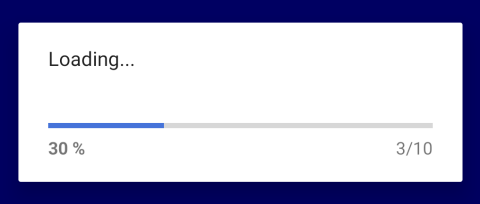 |
A progress indicator can be used to show the progress of an operation in the UI to let the user know that some action is taking place. It is used to indicate an ongoing activity of determinate or indeterminate length.
Use the Titanium.UI.Android.createProgressIndicator method or <ProgressIndicator> Alloy
element to create a progress indicator.
A progress indicator can be either a progress dialog or a horizontal progress bar in the title of the window. The progress dialog is a modal dialog that blocks the UI. See also: Titanium.UI.Android.PROGRESS_INDICATOR_DIALOG, Titanium.UI.Android.PROGRESS_INDICATOR_STATUS_BAR.
NOTE: Titanium.UI.Android.PROGRESS_INDICATOR_STATUS_BAR does not work anymore on devices running Android 4.4+ since the underlying API was deprecated and removed by Google. See TIMOB-27312 for more details.
Calling Titanium.UI.Android.ProgressIndicator.show displays the indicator, and calling Titanium.UI.Android.ProgressIndicator.hide removes it.
Examples
Simple Progress Indicator
Click the button to show a progress indicator while some code executes and hide it on completion.
Ti.UI.backgroundColor = 'white';

var win = Ti.UI.createWindow({
  backgroundColor: 'blue'
});

var button = Ti.UI.createButton({
  title: 'Show Progress Dialog'
});

var progressIndicator = Ti.UI.Android.createProgressIndicator({
  message: 'Loading...',
  location: Ti.UI.Android.PROGRESS_INDICATOR_DIALOG,
  type: Ti.UI.Android.PROGRESS_INDICATOR_DETERMINANT,
  cancelable: true,
  min: 0,
  max: 10
});

button.addEventListener('click', function (e) {
  progressIndicator.show();
  var value = 0;
  setInterval(function(){
    if (value > 10) {
        return;
    }
    progressIndicator.value = value;
    value ++;
  }, 200);
  // do some work that takes 3 seconds
  // ie. replace the following setTimeout block with your code
  setTimeout(function(){
    progressIndicator.hide();
  }, 3000);
});

win.add(button);
win.open();
Alloy XML Markup
Previous example as an Alloy view-controller.
index.xml:
<Alloy>
    <Window backgroundColor="blue">
        <Button id="button" onClick="showIndicator">Show Progress Dialog</Button>

        <ProgressIndicator ns="Ti.UI.Android" platform="android" id="progressIndicator"
          message="Loading..." min="0" max="10" cancelable="true"
          location="Ti.UI.Android.PROGRESS_INDICATOR_DIALOG"
          type="Ti.UI.Android.PROGRESS_INDICATOR_DETERMINANT" />
    </Window>
</Alloy>
index.js:
function showIndicator(e) {
    $.progressIndicator.show();
    var value = 0;
    setInterval(function(){
        if (value > 10) {
            return;
        }
        $.progressIndicator.value = value;
        value ++;
    }, 200);
    // do some work that takes 3 seconds
    // ie. replace the following setTimeout block with your code
    setTimeout(function(){
        $.progressIndicator.hide();
    }, 3000);
}
$.index.open();
Properties 29
Inherited from Titanium.UI.View
Boolean value to remove the long press notification for the device's accessibility service.
Default: true
Inherited from Titanium.Proxy
The name of the API that this proxy corresponds to.
Inherited from Titanium.Proxy
Indicates if the proxy will bubble an event to its parent.
Default: true
cancelable
BooleanWhen true allows the user to cancel the progress dialog by pressing the BACK button.
When cancelable is set to true and this is set to true, the dialog is canceled when touched outside the window's bounds.
Default: false
Inherited from Titanium.UI.View
Base elevation of the view relative to its parent in pixels.
Inherited from Titanium.UI.View
Discards touch related events if another app's system overlay covers the view.
Default: false
id
StringInherited from Titanium.UI.View
View's identifier.
Inherited from Titanium.UI.View
A value indicating the render mode of the View
Default: false
Inherited from Titanium.Proxy
The Window or TabGroup whose Activity lifecycle should be triggered on the proxy.
location
NumberLocation for the progress indicator.
Default: <Titanium.UI.Android.PROGRESS_INDICATOR_DIALOG>
max
NumberMaximum value of the progress bar.
message
StringMessage text.
messageid
StringKey identifying a string in the locale file to use for the message text.
Only one of message or messageid should be specified.
min
NumberMinimum value of the progress bar.
Inherited from Titanium.UI.View
Clockwise 2D rotation of the view in degrees.
Inherited from Titanium.UI.View
Clockwise rotation of the view in degrees (x-axis).
Inherited from Titanium.UI.View
Clockwise rotation of the view in degrees (y-axis).
Inherited from Titanium.UI.View
Scaling of the view in x-axis in pixels.
Inherited from Titanium.UI.View
Scaling of the view in y-axis in pixels.
Inherited from Titanium.UI.View
The default text to display in the control's tooltip.
Inherited from Titanium.UI.View
A material design visual construct that provides an instantaneous visual confirmation of touch point.
Default: false
Inherited from Titanium.UI.View
Optional touch feedback ripple color. This has no effect unless touchFeedback is true.
Inherited from Titanium.UI.View
A name to identify this view in activity transition.
Inherited from Titanium.UI.View
Horizontal location of the view relative to its left position in pixels.
Inherited from Titanium.UI.View
Vertical location of the view relative to its top position in pixels.
Inherited from Titanium.UI.View
Depth of the view relative to its elevation in pixels.
type
NumberType for the progress indicator.
Default: <Titanium.UI.Android.PROGRESS_INDICATOR_INDETERMINANT>
Methods 10
Inherited from Titanium.Proxy
Adds the specified callback as an event listener for the named event.
| Parameters | Type | Description |
|---|---|---|
| name | String | Name of the event. |
| callback | Callback<Titanium.Event> | Callback function to invoke when the event is fired. 4 fields
|
applyProperties
since 3.0.0Inherited from Titanium.Proxy
Applies the properties to the proxy.
| Parameters | Type | Description |
|---|---|---|
| props | Dictionary | A dictionary of properties to apply. |
Inherited from Titanium.Proxy
Fires a synthesized event to any registered listeners.
| Parameters | Type | Description |
|---|---|---|
| name | String | Name of the event. |
| event? | Dictionary | A dictionary of keys and values to add to the Titanium.Event object sent to the listeners. |
getViewById
since 6.1.0Inherited from Titanium.UI.View
Returns the matching view of a given view ID.
| Parameters | Type | Description |
|---|---|---|
| id | String | The ID of the view that should be returned. Use the |
Hides the progress indicator and stops the animation.
insertAt
since 3.3.0Inherited from Titanium.UI.View
Inserts a view at the specified position in the children array.
| Parameters | Type | Description |
|---|---|---|
| params | ViewPositionOptions | Pass an object that specifies the view to insert and optionally at which position (defaults to end) 2 fields
|
Inherited from Titanium.Proxy
Removes the specified callback as an event listener for the named event.
| Parameters | Type | Description |
|---|---|---|
| name | String | Name of the event. |
| callback | Callback<Titanium.Event> | Callback function to remove. Must be the same function passed to 4 fields
|
replaceAt
since 3.3.0Inherited from Titanium.UI.View
Replaces a view at the specified position in the children array.
| Parameters | Type | Description |
|---|---|---|
| params | ViewPositionOptions | Pass an object with the view to insert and the position of the view to replace. In this case the 2 fields
|
Shows the progress indicator and starts the animation.
stopAnimation
since 12.1.0Inherited from Titanium.UI.View
Stops a running animation.
Events 2
Fired when the user has canceled the progress indicator dialog.
The user triggers this event by pressing the BACK button when the dialog is visible. The dialog will be hidden and this event dispatched.
rotate
since 12.7.0Inherited from Titanium.UI.View
Fired when the device detects a two finger rotation.
| Event properties | Type | Description |
|---|---|---|
| rotate | Number | Rotation in degrees. |