You are reading 13.0.0. See this page in 13.4.1.
Titanium.UI.EmailDialog
Extends Titanium.UI.ViewTitanium.Proxy
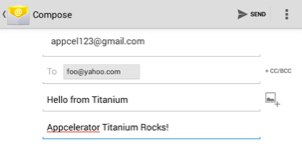
An email dialog is a modal window that allows users to compose and send an email.
| Android | iOS |
|---|---|
 |
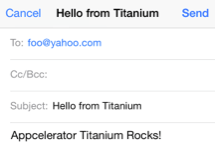 |
The Email Dialog is created with the Titanium.UI.createEmailDialog method. The user needs to register an e-mail account on the device in order to open the dialog. The dialog will not open when there is not a registered e-mail account.
iOS Platform Notes
On iOS, you cannot test the e-mail dialog on the iOS Simulator. Test the email dialog on device.
Examples
Simple Email Dialog with Attachment
Create and send an email with a file attachment.
var emailDialog = Ti.UI.createEmailDialog()
emailDialog.subject = "Hello from Titanium";
emailDialog.toRecipients = ['foo@yahoo.com'];
emailDialog.messageBody = '<b>Titanium SDK Rocks!</b>';
var f = Ti.Filesystem.getFile('cricket.wav');
emailDialog.addAttachment(f);
emailDialog.open();
Properties 34
Inherited from Titanium.UI.View
Boolean value to remove the long press notification for the device's accessibility service.
Default: true
Inherited from Titanium.Proxy
The name of the API that this proxy corresponds to.
Bar color of the email dialog window, as a color name or hex triplet.
For information about color values, see the "Colors" section of Titanium.UI.
bccRecipients
Array<String>Recipients of the email included via the BCC (Blind Carbon Copy) field.
Inherited from Titanium.Proxy
Indicates if the proxy will bubble an event to its parent.
Default: true
Constant for the CANCELLED status result. On Android, this property exists but is not used.
ccRecipients
Array<String>Recipients of the email included via the CC (Carbon Copy) field.
Inherited from Titanium.UI.View
Base elevation of the view relative to its parent in pixels.
Constant for the FAILED status result.
Inherited from Titanium.UI.View
Discards touch related events if another app's system overlay covers the view.
Default: false
Inherited from Titanium.UI.View
Adds a horizontal parallax effect to the view
html
BooleanDetermines whether the email message, specifically the contents of messageBody, should be sent as HTML content type rather than plain text.
Default: false
id
StringInherited from Titanium.UI.View
View's identifier.
Inherited from Titanium.Proxy
The Window or TabGroup whose Activity lifecycle should be triggered on the proxy.
messageBody
StringEmail message body.
Inherited from Titanium.UI.View
The preview context used in the 3D-Touch feature "Peek and Pop".
Inherited from Titanium.UI.View
Clockwise 2D rotation of the view in degrees.
Inherited from Titanium.UI.View
Clockwise rotation of the view in degrees (x-axis).
Inherited from Titanium.UI.View
Clockwise rotation of the view in degrees (y-axis).
Constant for the SAVED status result. On Android, this property exists but is not used.
Inherited from Titanium.UI.View
Scaling of the view in x-axis in pixels.
Inherited from Titanium.UI.View
Scaling of the view in y-axis in pixels.
Constant for the SENT status result.
subject
StringSubject line for the email.
Inherited from Titanium.UI.View
The default text to display in the control's tooltip.
toRecipients
Array<String>Recipients of the email included via the main TO field.
Inherited from Titanium.UI.View
A material design visual construct that provides an instantaneous visual confirmation of touch point.
Default: false
Inherited from Titanium.UI.View
Optional touch feedback ripple color. This has no effect unless touchFeedback is true.
Inherited from Titanium.UI.View
A name to identify this view in activity transition.
Inherited from Titanium.UI.View
Horizontal location of the view relative to its left position in pixels.
Inherited from Titanium.UI.View
Vertical location of the view relative to its top position in pixels.
Inherited from Titanium.UI.View
Depth of the view relative to its elevation in pixels.
Inherited from Titanium.UI.View
Adds a vertical parallax effect to the view
Methods 14
Adds an attachment.
On Android, multiple attachments may be added, but will only work if the user chooses to send via the Android Gmail or K9 mail clients.
The Android "Mail" app, which is only available on some handsets, will only accept one attachment from a Titanium app.
| Parameters | Type | Description |
|---|---|---|
| attachment | Titanium.Blob | Titanium.Filesystem.File | Attachment to include in the email. |
Inherited from Titanium.Proxy
Adds the specified callback as an event listener for the named event.
| Parameters | Type | Description |
|---|---|---|
| name | String | Name of the event. |
| callback | Callback<Titanium.Event> | Callback function to invoke when the event is fired. 4 fields
|
applyProperties
since 3.0.0Inherited from Titanium.Proxy
Applies the properties to the proxy.
| Parameters | Type | Description |
|---|---|---|
| props | Dictionary | A dictionary of properties to apply. |
Inherited from Titanium.UI.View
Removes all previously added motion effects.
Inherited from Titanium.Proxy
Fires a synthesized event to any registered listeners.
| Parameters | Type | Description |
|---|---|---|
| name | String | Name of the event. |
| event? | Dictionary | A dictionary of keys and values to add to the Titanium.Event object sent to the listeners. |
getViewById
since 6.1.0Inherited from Titanium.UI.View
Returns the matching view of a given view ID.
| Parameters | Type | Description |
|---|---|---|
| id | String | The ID of the view that should be returned. Use the |
Inherited from Titanium.UI.View
Hides this view.
| Parameters | Type | Description |
|---|---|---|
| options? | AnimatedOptions | Animation options for Android only. Since SDK 5.1.0 and used only on Android 5.0+ Determines whether to enable a circular reveal animation.
Note that the default here is equivalent to passing in |
insertAt
since 3.3.0Inherited from Titanium.UI.View
Inserts a view at the specified position in the children array.
| Parameters | Type | Description |
|---|---|---|
| params | ViewPositionOptions | Pass an object that specifies the view to insert and optionally at which position (defaults to end) 2 fields
|
Indicates whether sending email is supported by the system.
On iOS 10, the user is able to uninstall the built-in applications including Mail. Because of that, you should ensure to check if the email dialog is supported on the current device.
Opens this email dialog.
| Parameters | Type | Description |
|---|---|---|
| options? | AnimatedOptions | Supported on iOS only. Simple object to override animation. Note that the default here is equivalent to passing in |
Inherited from Titanium.Proxy
Removes the specified callback as an event listener for the named event.
| Parameters | Type | Description |
|---|---|---|
| name | String | Name of the event. |
| callback | Callback<Titanium.Event> | Callback function to remove. Must be the same function passed to 4 fields
|
replaceAt
since 3.3.0Inherited from Titanium.UI.View
Replaces a view at the specified position in the children array.
| Parameters | Type | Description |
|---|---|---|
| params | ViewPositionOptions | Pass an object with the view to insert and the position of the view to replace. In this case the 2 fields
|
Inherited from Titanium.UI.View
Makes this view visible.
| Parameters | Type | Description |
|---|---|---|
| options? | AnimatedOptions | Animation options for Android only. Since SDK 5.1.0 and only used on Android 5.0+ Determines whether to enable a circular reveal animation.
Note that the default here is equivalent to passing in |
Inherited from Titanium.UI.View
Stops a running animation.
Events 2
Fired when this email dialog has completed sending an email.
| Event properties | Type | Description |
|---|---|---|
| success | Boolean | Indicates if the email was handled successfully.
Returns |
| error | String | Error message, if any returned. Will be undefined if |
| code | Number | Error code.
Error code will be 0 if |
| result | Number | Status of the email send process. The On Android, this property will return |
rotate
since 12.7.0Inherited from Titanium.UI.View
Fired when the device detects a two finger rotation.
| Event properties | Type | Description |
|---|---|---|
| rotate | Number | Rotation in degrees. |